

Understanding Microsoft’s Negotiation Strategies


Most companies are paying 20-50% more than they should be on their Microsoft contracts. In this article, we are going to walk through what you need to know about negotiating with Microsoft, as well as specific tactical levers you can use to reduce your Microsoft contract by up to 50%.
8 Important things to note when it comes to negotiating your Microsoft contracts:
- Your sales rep has two key drivers: to get your company to adopt Azure and to sell you an E5 license.
- The Business Desk makes all of the final decisions regarding price, etc.
- The Divide and Conquer approach is still the most common tactic to drive sales.
- Microsoft’s fiscal year strategically ends on June 30th so they can capture multi-year budgets from their enterprise clients.
- Putting a price cap on a specific product does nothing to ensure your company’s rates because Microsoft changes product SKUs so regularly that your price cap will be null and void the next time you go to negotiate.
- Make sure that you have the appropriate affiliate language to ensure your entire company can use the products the right way.
- Consider whether your company would benefit from a Microsoft Products and Services Agreement (MPSA)
- If you’re switching from a Perpetual Agreement to an Office 365 contract, you have the opportunity to capture the lowest price you’ll ever receive from Microsoft.
Is this article we'll cover all those points in depth so you can understand Microsoft's negotiation strategy.
What you need to know when negotiating with Microsoft
Microsoft has a footprint in nearly every established company in the world. The Microsoft Office Suite revolutionized the way we work since nearly the beginning of the internet.
While the company has experienced both successes and challenges in its history, Microsoft has profited as a result of two primary factors: 1) a good product, and (equally as important) 2) a great enterprise sales team.
We’ll spare you a history lesson about Microsoft here but it’s important to recognize and respect the strength of their first mover advantage and subsequent (now legacy) footprint. This history has allowed Microsoft to be a fast follower with adjacent technologies within the marketplace. In other words, Microsoft monitors new concepts and technologies in the marketplace prior to investing their own resources. This strategy has largely worked over the last two decades as Microsoft will simply build or buy a proven technology stack that has proven successful and plug and play into their existing customer base.
Fast forward to present day, Microsoft Entreprise continues to be a fast follower within the marketplace. Their legacy footprint has allowed for continuous introductions of new technologies to their existing client base. Software as a Service (SaaS) solutions has significantly lowered the barrier to entry for new technologies to be introduced to their client base. This has created a new dynamic for Microsoft as it now employs tactics to eliminate competing technologies within its legacy client base. We will discuss these tactics in further detail within this article.
How Microsoft's pricing model has evolved
Up until 2011, Microsoft’s primary revenue stream originated from 1) net new technology sales and 2) maintenance fees. The new technology sales were largely on-premise meaning the software would be installed within a customer’s server environment. For those existing customers, Microsoft earned an 18% maintenance fee (calculated from the original purchase price) simply by pushing technology upgrades to the customer. This maintenance fee was largely recession proof as companies largely paid for upgrades thinking they were required but rarely ever installing the actual upgrade. As the market evolved into a SaaS based consumption model, Microsoft introduced Office 365 to drive predictable monthly revenue from their customers.
This new pricing model has transformed its business and propelled its revenue. This evolution has allowed them to push adjacent SaaS services to their clients such as cloud storage, security services, etc.
Because they are now training their clients to purchase software on a subscription model, it’s easier for Microsoft sales representatives to upsell other products. Knowing how a sales rep is incentivized and how they think will allow you to make the best decisions for your company and negotiate effectively.
Through our active Microsoft negotiations across a wide variety of companies, we have a constant pulse on which products Microsoft is currently incentivizing. This can help you gain significant leverage in your negotiation.
What is your sales representative's role in a Microsoft Negotiation?
Your Microsoft sales representative’s primary job is to gather as much intelligence as possible from your organization’s stakeholders in the interest of finding new products and services to push into your organization. On the contrary, your goal is often to control and/or reduce expenditures for your company. This means your intentions are automatically at odds.
Based on the new dynamic landscape within the marketplace, Microsoft Entreprise is now focused on eliminating any competing solutions from their customer’s technology stack. As discussed previously, Microsoft’s acquisition strategy has largely been focused on those technologies which have developed a large footprint within their customers. Your Microsoft sales representative is highly incentivized to eliminate competing software from your environment and will make the case that you are able to achieve cost savings by simply eliminating these competing solutions. At face value this sound nice but in practice it’s rarely ever true without proper negotiation support.
While there are some benefits to centralizing your technology through a single source, rarely is cost-savings one of those benefits. The cost savings presentation sounds well and good, but it often doesn’t lead to any actual value-capture benefits for companies. Instead, Microsoft gains a larger share of your technology stack and, with it, more negotiating power.
We’re seeing this increasingly with the promotion of Azure, their cloud solution, Power BI, their analytics tool, and anything machine learning and/or artificial intelligence related. These priorities will change as new products are developed but the principles are the same.
Within the last 2 years, Microsoft (like Google and their G-Drive) has started to build technologies that are reliant on the Azure platform to work properly. This forces companies that were not originally interested in Microsoft Azure to introduce the capability into their environment. Microsoft is hoping that your storage requirements grows both organically and inorganically.
Based on polling, we find that 87% of Microsoft customers expand their utilization of Azure within 2 years after the technology is introduced into their organization. This is complemented by the fact Microsoft, Amazon, and Google have made purchasing storage so simple and commoditized that anyone with the organization can do it. This is literally the ideal situation for Microsoft.
From an Office 365 perspective, your sales rep will want to push you toward an E5 license. This is their highest tier license for enterprise customers. Naturally, this is also their most expensive product which drives the greatest sales incentive for your sales representative.
To summarize, your sales representative’s top 2 priorities are:
- Get your company to adopt Azure.
- Get your company to purchase an E5 license.
What is the Microsoft ‘Business Desk’?
While your sales rep (i.e. “Account Executive”) and their management (i.e. “Vice President of xyz”) will be your primary point of contact, they have very little decision authority once it comes to rate adjustments..
That’s where the “business desk’ comes in. Microsoft has been testing, validating, and refining this concept for years and they’ve got it down to a science.
The ‘business desk’ is the Bad Cop to your seemingly accommodating sales rep’s role of Good Cop. The sales rep portrays a helpful, eager personality but they can’t finalize any decisions that actually affect your rates. The business desk contemplates their options, makes decisions, develops the basic communication plan, and informs the sales reps next actions with you, the client.
If you want to get the best rates possible for your company, you need to train your sales rep on how to interact with and communicate with the business desk on your behalf. With the right combination of messages and timing you can meet or exceed your negotiation goals.
They Will Try to Divide and Conquer
The Divide and Conquer tactic is widely known as one of the oldest plays in every enterprise sales playbook. The tactic has been used for years across all industries as it continually proves to be successful in driving more revenue.
Your Microsoft sales team will build relationships at multiple levels of your organization to learn more about the potential software needs of your organization than you do. They will use this information to introduce products and services to different levels of the organization to create buy-in and acceptance prior to any negotiation officially starting.
If you are a sizable account with Microsoft ($1M+ per year) you will also have some executive attention within Microsoft. This team will naturally want to engage with your (the customer) executive team to “gain alignment.” While executive relationships between your two organizations is not always a bad thing, it’s important expectations are carefully managed so that your executive team doesn’t agree to products or services you may not actually need. It’s best to create a negotiation plan that includes how and when your executives will communicate with Microsoft (if at all).
We have found that the large majority of our executive clients have an interest in participating in the negotiation. It’s important you include them in your communication planning so that they too can be empowered to participate within the guidelines you establish for them.
As for the rest of the organization, drive alignment across all your stakeholders within your organization early and often. Make sure everyone is on the same page about your needs, your budget, and your forward-looking initiatives and business plans.
You need to get clear on what you need and when you need it. If Microsoft is successful in their Divide and Conquer technique, they’ll tell you the answers to these questions and their answers will be an over-inflated version of what you would develop internally.
Microsoft Contract Language Risk Mitigation
What is Microsoft's Fiscal Year?
Like Salesforce, Microsoft does not follow the typical calendar year in the interest of accessing two corporate budgets. Microsoft’s fiscal year ends on June 30th of each year.
They do this in order to split their software expense across two corporate budget years to capture 1) end of year funds and 2) new budgets from their clients before they spend it.
Quick Win: How to properly negotiate Price Caps
Often we find clients have negotiated a price cap on specific products rather than on the total spend of the contract.
While price caps are well intended by the client, the problem is that Microsoft literally invented the concept of price caps in the early days of enterprise agreements to overcome buyer reservations. Microsoft subsequently defeats these protections by simply changing product names and SKU numbers on a frequent basis. In other words, if you put a price cap on a specific product during your negotiation, that product will almost certainly have changed at the time of your renewal in 1, 3, or 5 years which effectively negates any protection intended by the customer. Instead of placing a price cap directly on defined products, we recommend you establish protection based on the total spend of your contract.
Affiliate Language
Ensure that you have proper affiliate language in your contract. This means that multiple different subsidiaries of a company can use the same license versus having to have their own separate contracts. We’ve seen this trap laid in a few different M&A situations, specifically.
License Floors
In the world of business, it’s common for software companies to acquire or divest business units on a regular basis. Especially with our private equity clients, adding or removing thousands of employees each month is not uncommon.
Frequently, the contract will state that a certain amount of licenses allows for specific price reductions. With companies changing size and needing different licenses so frequently, this can be a problem. It’s important to create the lowest floor possible so that you aren’t hit with any penalties and avoid renegotiation triggers.
Areas of Opportunity
As with our Salesforce negotiations, we help our clients determine both the Right Size and Right Price approach for their specific needs. While companies like Gartner provide a wealth of information with tactics and general rate benchmarking, we recommend narrowing down the data to determine which companies are your closest peers in terms of industry, size, AND annual spend.
Obtain Net New Products at Very Reasonable (or Free) Prices
Showing interest in the incentivized products we mentioned earlier can reap huge rewards for your company. Use these products to drive cost savings within your core product baseline costs as well as to add new digital capabilities for little to no cost.
Don’t Over-License
In order to know what software license type you require, you need to have a clear understanding of how different stakeholders within your company are going to use your various Microsoft products. Develop no more than five personas for your organization based on how you’re going to use the platform. These personas will inform your license strategy.
Within our Right Size process we start by isolating the core functionality utilized by each persona and then matching that to the capabilities available within the various products. Using the Microsoft Office 365 Suite as an example, your Microsoft sales team will almost always recommend purchasing the E5 license for your organization as it offers the greatest capability, protection, etc (blah, blah, blah).
Rarely do our clients ever need the E5 license (only 5% to be exact). In fact, most organizations don’t even use the full capability offered within E3. This is why it’s so important to develop specific personas based on utilization within your organization. In a perfect world, you would be able to assign different license types based on the unique demands from each of your personas. In other words, it’s very common for the output of our Right Size assessment to suggest E3, E1, and K1 (yes, there is such a thing) within a client’s environment in the interest of driving the lowest total cost of ownership (TCO) with the greatest digital capability.
The simple act of selecting a lower license than the E5 (if appropriate) can save your company 60% or more.
Another example of successful Right Sizing is the isolation of shared computers. Within the manufacturing and healthcare industries, there are often shared computers that are available and used by multiple employees. Microsoft’s standard approach is to license each individual person in the company with an individual license. If you have shared computers, instead of licensing each individual you simply need to license each shared device. You can purchase a restricted use license with a desktop version for Windows and Office. For example, Instead of five employees being assigned five individual E5 licenses, you now have a single low priced license that meets their needs.
Another restricted-use license includes having an “email only” license for those that don’t need a computer but just want access to work email from their own devices.
In other cases, we’ve helped some clients realize they don’t need Office 365 at all and they can simply stay with their perpetual license. License types truly depend on the client and their individual needs.
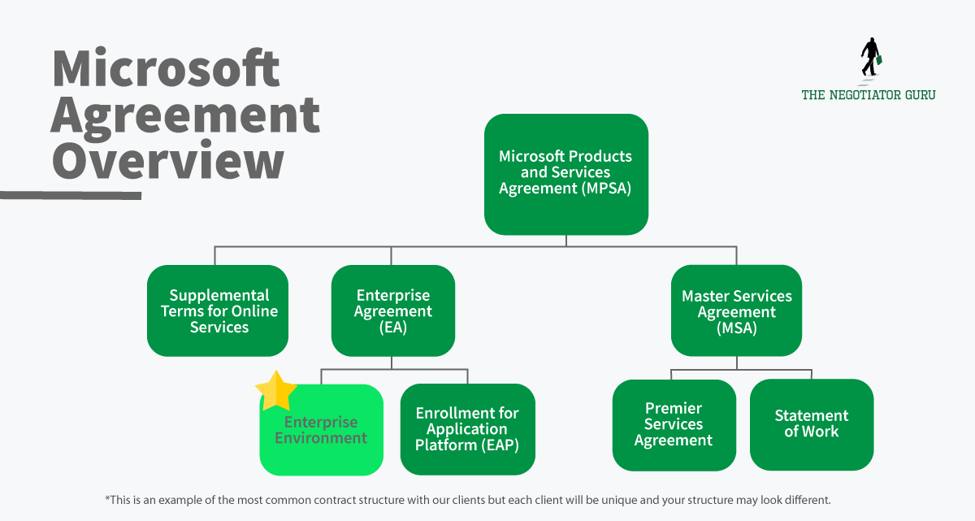
Get an MPSA
During your renewal you should take an inventory of your multiple agreements (servers, office products, etc.) and explore the benefits and risks of combining under one agreement called the Microsoft Products and Services Agreement (MPSA). The MPSA acts as a parent to the child agreements for your individual products and services and makes for an easier and more streamlined contracting experience down the road for all involved.
Historically, your Office products are on an Enterprise Agreement while the infrastructure products are on a Server & Cloud Enrollment (SCE) Agreement.
The more you can consolidate and co-term your agreements, the more leverage you’ll have. You’ll be able to negotiate the entire consolidated contract with the “business desk” versus two or more separate, and distinct contracts.
What you need to know about converting from a perpetual license to a subscription based license (Office 365)
If you’re converting from a perpetual license to an Office 365 contract, you have a huge opportunity to capture the lowest price point you’re ever going to get from Microsoft.
This conversion is its own license - it has its own SKU. The reason for this is that you’ve already paid for a part of that license through your original perpetual license purchase. If properly negotiated, the cost for this conversion license should only be the difference between the upgrade cost (current version to new) and your original cost.
Most Microsoft customers don’t know about this opportunity and let this massive cost avoidance opportunity slip through the cracks never to be seen again.
For context, the price difference is about 50% and it will be realized year-over-year. If properly negotiated, you'll reap continuous benefits from this opportunity.
FAQ's
What is the difference between Microsoft E1, E3, E5 licenses?
The difference between a Microsoft E1, E3, E5, and K1 license is in capability. The primary differences are:
- The number of Microsoft apps you can access;
- If you have download rights; and,
- If you can download the application (desktop version) versus online only (web browser access).
Microsoft Office 365 E1 is your “lowest” level license for the Microsoft Office Suite via web browser access.
Microsoft 365 E3 is your basic mid-level license which includes additional applications and allows users to download desktop applications. This by far the most common license for all enterprises. Microsoft 365 E5 is your highest level license which includes your core apps, download rights, and specialized apps like Advanced Threat Protection (ATP), etc. There are several other core licenses (suck K1, F1, Desktop Only, etc.) which can, and should, be used to lower your Microsoft spend. For most organizations, an E1 or E3 license will satisfy most of your end-users requirements. Can I mix E1, E3, and E5 licenses within a Microsoft contract?
Microsoft 365 E5 is your highest level license which includes your core apps, download rights, and specialized apps like Advanced Threat Protection (ATP), etc. There are several other core licenses (suck K1, F1, Desktop Only, etc.) which can, and should, be used to lower your Microsoft spend. For most organizations, an E1 or E3 license will satisfy most of your end-users requirements.
Can I mix E1, E3, and E5 licenses within a Microsoft contract?
While most companies who are longtime Microsoft users understand that you can mix several different products and services within an Enterprise Agreement, many aren’t aware of the fact that you can mix and match different license types for your core licenses as well.
In a well negotiated (and proactively managed) Microsoft contract, it’s very common for different persona groups to leverage different core licenses in the interest of Right Sizing™ your environment.
For example, a persona group in your company may use an E1 license, and then a different persona group (such as your IT department) may use an E5 license, depending on their use case.
If you are not mixing licenses at the moment, then you are likely paying for capability you don’t need for a subset of users who do not need the fully upgraded licenses.
How do you know what Microsoft license you need?
The easiest way to figure out what you need from a Microsoft license perspective is to hire an outside advisor to help you with that analysis.
It is much faster to hire someone who looks at licenses all day and can match up your needed capabilities with the ideal license type.
If you are going to do this yourself, the best way is to dive deep into the spec sheets on the license pages for each license on Microsoft’s website.
It is also very important to conduct a persona analysis inside of your organization if you have not already done so. This is a simple process.
- Identify 1-5 personas within your organization who use Microsoft products. These would be different individuals who use Microsoft in different ways.
- Identify the specific needs and wants of each persona group as it relates to Microsoft.
- Match each persona’s needs and wants to the best fitting license type for that persona group.
This is part of our Right Size™ secret sauce at The Negotiator Guru and how we help our clients reduce their spend with Microsoft.
What does the Microsoft contract structure look like?
The Microsoft contract structure is a constantly changing evolution. Historically, Microsoft has had Enterprise Agreements, Master Service Agreements, and supplemental terms and conditions that are unique to a specific product set. Historically, these have all acted as individual contracts. What Microsoft has done over the last 3-5 years is rolled all of their contracts into the Microsoft Products and Service Agreement (MPSA). It is a contractual container for these existing MSA’s, EA’s, and supplemental terms and conditions.What you want to do is be very careful when Microsoft is asking you to sign brand new agreements. More often than not, you are actually in a better contractual position by using your existing MSA’s, EA’s, and Supplemental Terms and then attaching that to the MPSA.
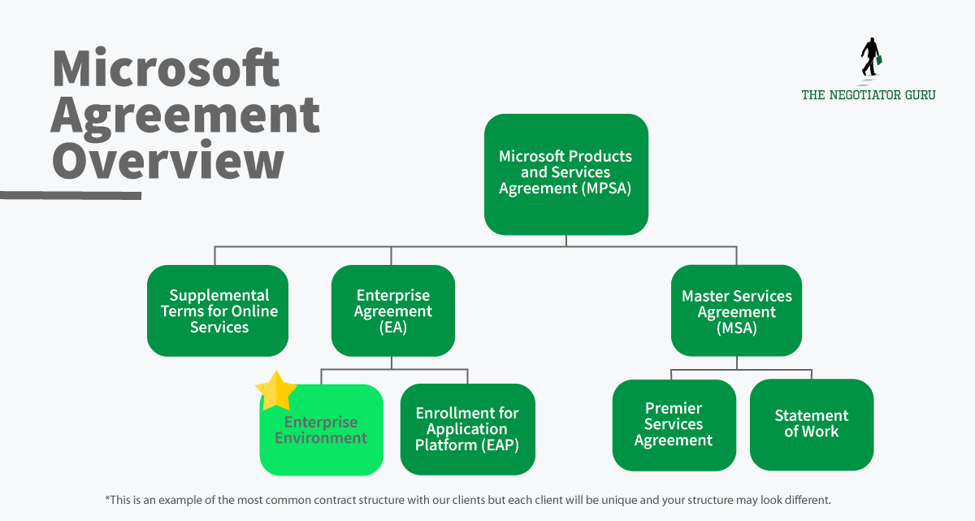
This is especially important because Microsoft is trying to move users to accepting online terms and conditions. While that may seem like a convenient aspect to contract management, with almost all of these online terms and conditions, there is a clause that allows them to change those terms and conditions at their will.
If this is not actively managed, changes within online terms and conditions can lead to unknown legal and/or commercial risk. We have many clients that engage us after they discover (either voluntarily or involuntarily) that they are out of compliance with their contract. The result can come in the form of an unbudgeted expense, lawsuit, and/or customer loss.
This is why it is extremely important to memorialize your specific contracts with Microsoft as much as possible...you can still do so within the new MPSA structure.
As you can see, contracts with Microsoft can quickly become complex which is why it is helpful to hire an outside advisor like The Negotiator Guru. Contact us today to discuss your Microsoft agreement.
What Microsoft products give me leverage in my negotiation?
There are certain Microsoft products that give you leverage in a negotiation with Microsoft. The short answer is that any product or service they have recently introduced to the marketplace (generally within the last 6 months) will provide amazing leverage for you.
The Microsoft sales team is highly incentivized to sell new products into existing accounts at renewals.
What is the typical term of a Microsoft contract?
A typical term of a Microsoft contract ranges anywhere from 3-7 years. The most common is 5 years with multinational enterprise customers.
For companies ranging from $5B-$15B in annual revenue, Microsoft will often do a lot of 1-3 year agreements.
For companies under $1B, Microsoft will often structure annual or month-to-month contracts.
Can you renegotiate a Microsoft contract early?
Yes. When you renegotiate early it is called an “early commit.” That being said, it’s important to note that not every early commit contract will provide value for the end customer. It’s very important that you hire an advisor like The Negotiator Guru to help you analyze the cost/benefit analysis of a new deal.
What are key risks of a Microsoft contract?
There are numerous risks that Microsoft customers can experience depending on what their environment looks like both in size, scope, and geographic footprint. One of the most common risks for all customers is the ability for Microsoft to audit customers. This is very similar to other software providers such as Oracle, SAP, Salesforce, etc. For a specific assessment of your contractual and/or technical architecture risk you’ll need to leverage an advisory firm like The Negotiator Guru.
To be clear, The Negotiator Guru does not provide 3rd party maintenance services like that of a Rimini Street but rather senior expert negotiation services. The two capabilities are very different and distinct.
Understanding Microsoft Audit Rights
Microsoft Audit rights typically emerge when you have any sort of restricted use license or on-premise architectural limitations. Related to the restricted use license, this is generally a custom made license for your company to serve a specific internal use case. These are negotiated licenses with Microsoft and can drive significant cost savings if used, and managed, correctly.
If you as the client don’t have a software asset management team, or the equivalent responsibilities assigned internally, then there is an increased risk that you’ll be audited and fined.
This audit risk typically comes up 6-8 months before your contract renewal. This is done by design by Microsoft to gather leverage for the upcoming renewal negotiation. In general, Microsoft will sometimes let audit compliance fees slip in exchange for new products and/or services within the customer’s renewing contract. Remember, this is largely driven by your account team who are highly incentivized to drive new product/service additions to the existing customer base.
Another typical resolution for compliance risk will be a required license upgrade which in turn satisfies your account team’s desire to increase their revenue of your account as well.
Are payment terms on a Microsoft contract negotiable?
Yes. Payment terms are negotiable.
Several years ago, Microsoft made a partnership with the banking sector to provide bridge financing. This makes it quite easy for a client to leverage payment terms of 180 days instead of the standard 30 days via their value added reseller (VAR).
You have the flexibility on payment terms. Simply ask Microsoft for the flexibility, and they will put you in touch with one of their payment partners like PNC Bank. The Negotiator Guru also has finance partners that allow our clients to extend their payment terms for any software contract including, but not limited to, Microsoft.
Can you change payment terms on a Microsoft contract from annual to quarterly?
Sometimes is the appropriate answer here. Depending on your specific situation, you may be able to change your payment terms from annual to quarterly or monthly.
Who has decision making authority inside of Microsoft and why?
There are multiple levels of decision making authority inside of Microsoft. That is purely by design. The decision making largely depends on the annual contract value of your new and/or prospect contract with Microsoft. Subsequently, the decision making rights change depending on if you are a new customer or a renewal customer.
For the purposes of a renewal, the primary decision maker is the business desk. This is a specific group inside of Microsoft that is meant to handle your renewal from end-to-end.
The business desk is incentivized to keep your revenue flat as their worst case scenario. Your account team is presented with a 10% revenue growth target for each of their accounts. If they are unable to satisfy this target, they will refocus their energy on those accounts where there is growth opportunity. At such time, they will hand off the deal to their renewal team at the “business desk.”
The business desk is essentially a sales enablement team in the background supporting your account team and driving the deal from behind the scenes.
To bypass this, you should aim to incorporate the business desk as part of your negotiation. This helps eliminate the extra step of the business desk being separate from your deals and improves the outcome of your negotiation.
The other thing you can do to improve your negotiation, and achieve better decision making authority, is to require a sales executive sponsor from Microsoft to join in on your negotiation. For example, if you spend $5M+ per year with Microsoft, you should require an SVP from the sales organization within Microsoft to be part of your negotiations.
With that type of connection, you can pass through a lot of back and forth and get to the bottom line much quicker.
When you have a high level sponsor involved in the deal, this enables you to exchange value in different ways with Microsoft such as collaborating on white papers, case studies, or structuring deals to work with Microsoft's innovation team, or test new products. Having a high level sponsor enables all of these additional leverage points to be brought into a negotiation.
The Bottom Line
Microsoft has a deliberately designed sales process and most companies are so entwined in their products that they readily accept new subscription charges and upgrades without digging deeper into their specific needs.
Our goal here is to help educate you on the best practices for negotiating with Microsoft. If you have additional questions or want to see more articles like this - whether for Microsoft or other SaaS companies - let us know so we know where to prioritize our focus for future articles.
More resources
From Fortune 500 giants to fast-growing innovators, TNG has helped clients save 20% – 40%+ on enterprise software contracts — even when they thought it was impossible
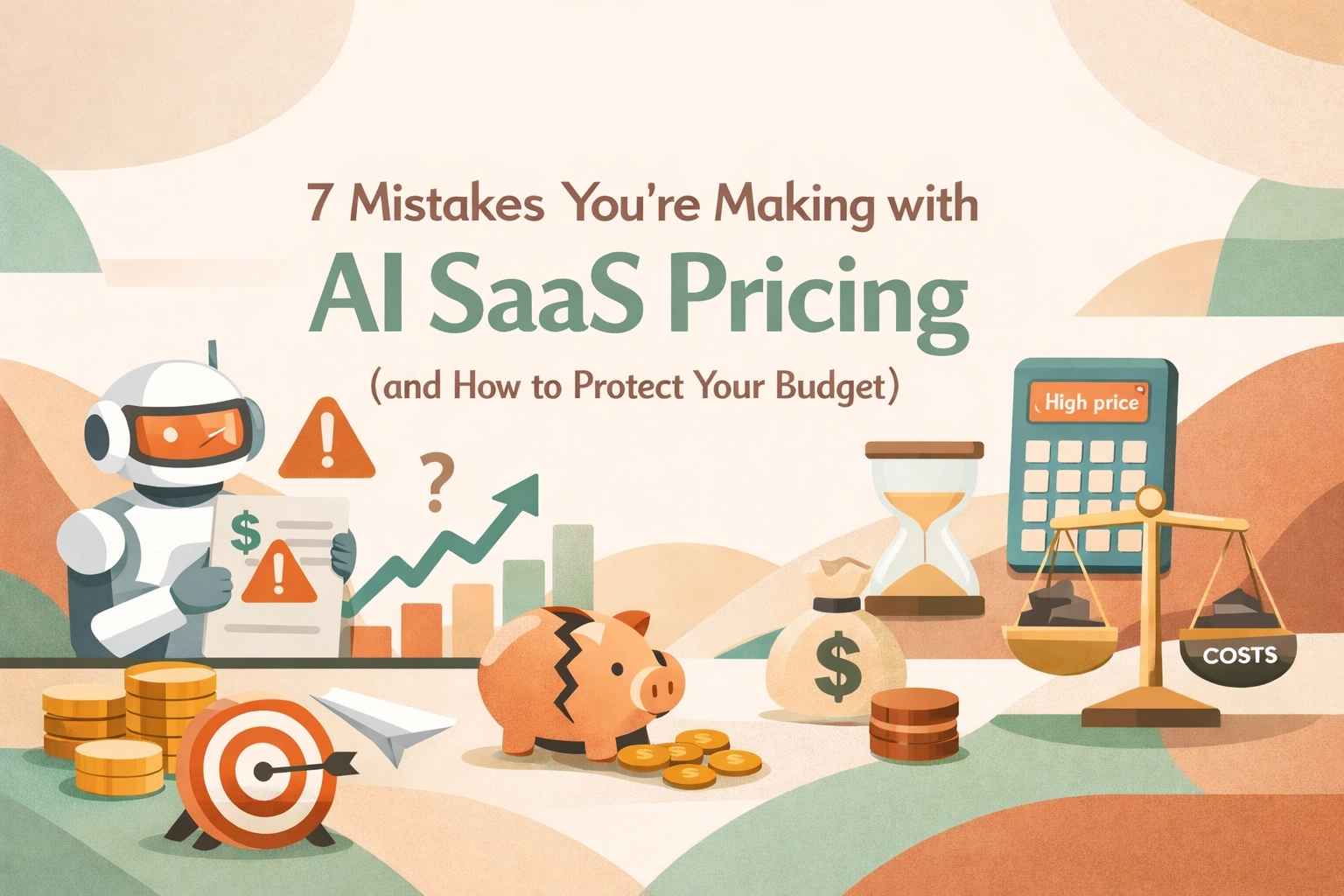
7 Mistakes You’re Making with AI SaaS Pricing (and How to Protect Your Budget)
Look, we all know AI is the shiny new toy in every C-suite's budget right now. Every vendor from Salesforce to Microsoft is slapping an "AI-powered" label on their modules and telling you it’s going to revolutionize your workflow. And maybe it will. But here’s the reality from the trenches: most enterprise leaders are walking into these AI negotiations blindfolded.
In the world of SaaS Negotiation Consulting, we’re seeing a massive shift. The old days of simple per-user pricing are dying. In their place, we have "tokens," "credits," "agentic steps," and "compute-based tiers." If you try to negotiate a 2026 AI contract using a 2018 playbook, you’re going to get crushed.
At The Negotiator Guru (TNG), we’ve been deep in the weeds of these renewals. If you want to protect your budget, stop making these seven common mistakes.
1. Buying the "Credit Pile" Before You Have the Proof
The most common mistake we see right now? Overcommitting on AI credits. Vendors love this because it locks in revenue for them while you take all the risk. They’ll tell you, "Buy 1,000,000 Agentforce credits now at a 40% discount, or pay retail later."
CIOs often bite because they don’t want to be the bottleneck for innovation. But here’s the kicker: most AI initiatives start slow. You might only use 10% of those credits in the first year. Since these credits rarely roll over, you’re essentially donating money to the vendor. Before you sign off on a massive credit commitment, you need a contract risk review to ensure you have clawback provisions or the ability to scale up: not just scale down.
2. Ignoring "Meter Anxiety" and Its Impact on ROI
When you move to usage-based pricing, your employees start acting differently. This is what we call "meter anxiety." If your team knows that every time they ask an AI agent to summarize a meeting it costs the company $0.50, they might stop using it.
The mistake here is choosing a pricing model that punishes experimentation. If you're negotiating for Microsoft Copilot or a similar tool, you need to understand how the pricing affects user behavior. If your goal is broad adoption, a pure usage-based model is your worst enemy. You’re better off fighting for a flat-fee "innovation sandbox" period where usage is uncapped until you establish a baseline.

3. Failing to Benchmark AI SKUs (Because You Think You Can’t)
"It’s a new product, there is no benchmark data yet."
That’s what the sales reps will tell you. Don't believe them. While AI SKUs are evolving rapidly, we are already seeing patterns in the market. Whether it’s Salesforce Agentforce or AI-add-ons for ServiceNow, there is always a baseline.
If you aren't using right-price benchmarking, you’re essentially letting the vendor set the market price based on your perceived "willingness to pay." We’ve seen price variations of over 50% for the exact same AI capabilities across different enterprise accounts. Don't be the one paying the "pioneer tax."
4. Treating AI Pricing as a Marketing Decision, Not System Architecture
This is a technical trap that Procurement leaders often miss. AI costs aren't static. The cost to a vendor for running a simple GPT-3.5 query is vastly different than a complex, multi-step "agentic" workflow using a high-reasoning model.
If you don't know the top two variance drivers of your AI tool: is it the number of steps? The volume of data processed? The frequency of real-time requests?: you aren't ready to sign the contract. A mistake here means that as your data grows or your workflows get more complex, your costs could scale exponentially while your budget stays linear. This is where full negotiation support becomes vital to ensure the technical architecture of the pricing matches your actual use case.
5. Overlooking the "Transparency Gap" in Usage Reporting
How do you know you’re actually using the credits you’re paying for? In many AI contracts, the vendor is the one holding the stopwatch and the measuring tape.
Many enterprise teams sign AI contracts without demanding a seat at the dashboard. You need real-time, granular visibility into how AI credits are being consumed. If the vendor can't provide a dashboard that shows usage by department, user, or project, walk away. Without transparency, you can’t perform a proper software audit later to see if you're getting a return on your investment.

6. Blind Faith in "Unlimited" Bundles
We’ve seen it before with cloud storage, and we’re seeing it now with AI. A vendor offers an "Unlimited AI" tier to get you to upgrade your entire ELA (Enterprise License Agreement).
Here’s the catch: "Unlimited" almost always has a "Fair Use Policy" buried in the fine print. These policies often give the vendor the right to throttle your performance or move you to a higher tier if your usage becomes "atypical." In the AI world, what is "typical" is changing every month. If you’re a CIO, you need to ensure your enterprise contract renewals explicitly define what "fair use" means in quantifiable terms. Otherwise, "unlimited" is just a marketing term for "we’ll bill you more later."
7. Not Negotiating the "Exit Ramp" for AI
AI is moving fast. The "must-have" tool you’re buying today might be obsolete in 18 months. The biggest mistake is locking yourself into a three-year or five-year deal with no flexibility to swap AI SKUs or reduce spend if the technology doesn't pan out.
Your contract should include "exchange rights." If you commit $500k to an AI module that your team hates, you should have the right to move that spend to other core licenses. Vendors hate this because it hurts their "AI growth" metrics, but for a Procurement leader, it’s the only way to hedge your bets in a volatile market.

How to Protect Your Budget Today
The AI hype train is moving fast, but that doesn't mean you have to jump on without a ticket. If you're facing a renewal or a new AI purchase, here’s your checklist:
Negotiating AI isn't just about getting a discount; it's about mitigating the massive risks that come with unpredictable, usage-based models. If you're worried about your next big AI spend, don't wing it. Reach out for a contract review and let’s make sure you aren’t overpaying for the hype.
The tech is new, but the game is the same. Stay confident, stay skeptical, and always check the meter.
Need help navigating your next AI renewal? At The Negotiator Guru, we specialize in SaaS negotiation consulting that saves enterprises millions. Contact us today to see how we can protect your bottom line.
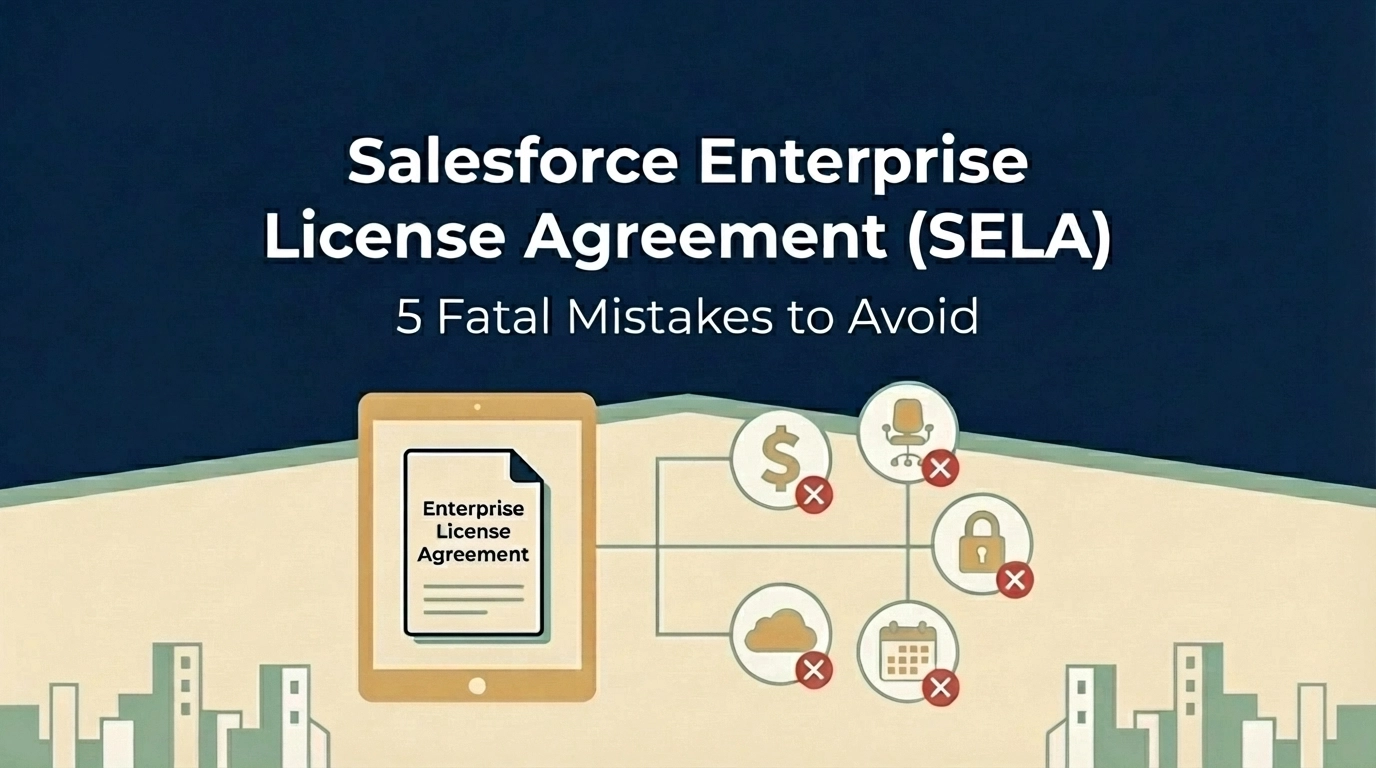
Are You Making These 5 Fatal Mistakes with Your Salesforce Enterprise License Agreement?
Your Salesforce Enterprise License Agreement (SELA) could be costing you millions more than it should. While these multi-year deals promise predictable pricing and enterprise-grade support, they're riddled with traps that can drain your IT budget faster than you can say "CRM transformation."
As someone who's seen countless enterprises stumble through salesforce renewal negotiations, I can tell you that most organizations make the same critical mistakes, and pay dearly for them. Whether you're a CIO planning your next renewal or a CFO trying to control spiraling software costs, these five fatal errors could be sabotaging your bottom line.
Mistake #1: The Baseline Trap, Overcommitting Based on Inflated Projections
Here's how it usually goes: Salesforce looks at your current usage, adds a "growth buffer," and locks you into user counts that seem reasonable today but become millstones tomorrow. This baseline trap is the most expensive mistake you can make in salesforce contract negotiation.
The problem? You're committing to licenses you may never use, and your per-user pricing gets locked at rates based on inflated projections. I've seen companies commit to 2,000 users when they realistically need 1,200, just because their sales rep painted a rosy picture of "inevitable growth."
The Fix: Negotiate growth as an option, not a requirement. Structure your SELA so you commit to baseline usage (say, 1,000 users in Year 1) with optional tiers that trigger only when specific business events occur: like a new subsidiary acquisition or product launch.
For example: "Client commits to 1,000 users in Year 1. If the European expansion launches by Q2, user count increases to 1,200. Otherwise, Year 2 renews at 1,000 users with the same discount structure."

Mistake #2: Ignoring Overage Penalties and Price Escalations
Most executives focus on the upfront discount and completely overlook two budget killers hiding in their SELA: overage fees and automatic price increases.
Salesforce charges overage fees at current retail pricing: often 2-3x your negotiated rates. Exceed your licensed user count by just 10%? You're paying full retail for those extra seats. Meanwhile, most SELAs include automatic 7% annual price increases that compound over multi-year terms.
I recently worked with a Fortune 500 company that discovered they were paying $400,000 annually in overage fees: money that could have funded their entire digital transformation initiative.
The Fix:
Mistake #3: Accepting Zero Transparency in Pricing
Traditional Salesforce agreements show line-item pricing for each product. SELAs? They bundle everything into a fixed-fee structure that makes it nearly impossible to understand what you're actually paying for.
This lack of transparency isn't accidental: it makes price manipulation during renewals much easier. Without clear visibility into per-product costs, your procurement team can't effectively benchmark pricing or negotiate specific components.
The Fix: Demand a comprehensive License Entitlement Matrix upfront that includes:
Don't accept vague product bundles. If Salesforce won't provide transparency, that's a red flag that their pricing isn't competitive.

Mistake #4: Signing Away All Contractual Flexibility
SELAs are rigid by design. Once signed, you cannot scale down user counts, change product mixes, or adjust to business realities. If your company decides mid-contract that you only need 500 licenses instead of 1,000, tough luck: you're paying for all 1,000 until renewal.
This inflexibility becomes especially problematic during economic downturns, restructurings, or strategic pivots. I've watched companies pay for thousands of unused Salesforce licenses while laying off employees.
The Fix:
Mistake #5: Falling Into Product Bundling Traps
Salesforce loves bundling products together to justify bigger discounts, but these bundles create dangerous dependencies. Your contract might stipulate that dropping Tableau causes your Sales Cloud discount to revert from 50% to 30%. Every product becomes intertwined, making optimization nearly impossible.
I've seen companies stuck paying for Marketing Cloud licenses they never use because unbundling would eliminate their discount on Service Cloud: creating a perpetual cycle of waste.
The Fix:

The Documentation Mistake That Costs Millions
Here's a bonus mistake that underlies all the others: relying on verbal promises from Salesforce sales reps.
"We usually don't enforce that clause." "We'll work with you if that situation comes up." "Trust me, we're flexible on overages."
If it's not written in your contract or order form, it doesn't exist. Period.
The Fix: Demand that every concession, promise, and "understanding" be documented in writing. If your sales rep claims flexibility exists, prove it by adding contract language that guarantees it.
Taking Control of Your Salesforce Investment
These mistakes aren't inevitable: they're the result of approaching salesforce enterprise license agreement negotiations without proper preparation and expertise. The key is treating your SELA like the multi-million dollar strategic decision it is, not just another software renewal.
Before your next negotiation:
Remember, Salesforce's sales team negotiates these deals every day. You might do it once every three years. The playing field isn't level unless you have the right strategy and support.
Your SELA should be a strategic enabler, not a financial anchor. By avoiding these five fatal mistakes, you can maintain the predictability and enterprise features you need while protecting your organization from unnecessary costs and inflexible terms.
The stakes are too high to get this wrong. Make sure your next Salesforce negotiation puts your organization in the driver's seat, not the passenger seat.
Need help navigating your Salesforce renewal? Our enterprise contract renewal specialists have saved organizations millions in unnecessary software costs. Learn more about our saas negotiation consulting services.
Salesforce Renewal Negotiations: 7 Vendor Tactics That Will Cost You Millions (And How to Counter Them)
Let's cut to the chase: Salesforce didn't become a $30+ billion company by accident. They've built a renewal machine that's incredibly effective at extracting maximum value from enterprise customers: often at your expense.
If you're a CIO, CFO, or procurement leader heading into a Salesforce renewal negotiation, you need to understand exactly what you're walking into. Because here's the uncomfortable truth: your Salesforce rep isn't your partner. They're a highly trained professional whose compensation depends on growing your contract value.
We've helped hundreds of enterprises navigate Salesforce contract negotiations, and we've seen every play in their playbook. Here are the seven tactics that cost organizations millions: and exactly how to counter each one.
Tactic #1: The Timing Trap
Salesforce will reach out months before your renewal: not to help you plan, but to control the conversation before you've had time to assess your actual needs. They'll frame this as "getting ahead of things" or "ensuring a smooth renewal."
Meanwhile, they're identifying upsell opportunities, understanding your budget cycle, and positioning themselves to apply pressure when you're most vulnerable.
The Counter-Move: Start your internal renewal planning 6 months before your renewal date. Audit your current usage, assess alternatives, and build executive alignment before Salesforce initiates contact. When you control the timeline, you control the negotiation.

Tactic #2: The Inflated Baseline
Here's a number Salesforce hopes you never discover: their initial renewal quote typically starts around 10% above your current spend: before any "negotiation" even begins.
Some of these increases are obvious (new list prices, added users) while others are buried in contract language and other means. The goal? Anchor the conversation at a higher number so that any "discount" they offer still results in you paying more than you should.
Furthermore, it's important to understand that your Salesforce AE has a 10%+ revenue uplift target at each renewal which creates an automatic conflict when you're trying to save money. If your account is a "flat" renewal from the previous contract year with no sign of new products/licenses/etc. then you'll be handed over to the renewal desk. This team is compensated differently with the ultimate objective of never allowing your account to decrease below your current spend. Naturally, this team is incentivized to ensure there is 5% revenue growth.
The Counter-Move: Conduct a thorough license audit before engaging. Many organizations discover they're paying for Premium editions when Standard would suffice, or carrying licenses for users who left the company years ago. Our Right Price Benchmarking™ service consistently reveals that enterprises overpay by 20-40% simply because they never questioned the baseline.
Tactic #3: The Automatic Uplift Clause
Buried in your Master Service Agreement are automatic renewal and price increase provisions. These clauses can escalate your costs by 3-7% annually: without any renegotiation, without any added value, and often without you even noticing until the invoice arrives.
The Counter-Move: Scrutinize your MSA for these provisions immediately. Calendar your renewal dates with 6-month advance alerts. When you do renegotiate, explicitly address these clauses and push for caps on annual increases or elimination of auto-renewal terms entirely.
Tactic #4: The True-Up Surprise
True-up clauses sound reasonable: you pay for what you actually use. In practice, they're a landmine waiting to explode your budget.
Without careful tracking, you might add users throughout the year thinking you're within your allocation: only to receive a six-figure true-up invoice at renewal. Salesforce counts on organizations losing track of their usage, and they're rarely wrong.
The Counter-Move: Implement quarterly internal audits to track actual usage against your contracted terms. Better yet, negotiate true-down rights into your contract: the ability to reduce licenses if your needs decrease, not just pay more when they increase.
Tactic #5: The Bundle Trap
This is one of Salesforce's most effective plays. Your rep will offer a "significant discount" on your renewal: but only if you bundle it with additional products, users, or support tiers you didn't ask for.
"I can get you 15% off, but only if we include Marketing Cloud in this deal."
Suddenly, your "discounted" renewal costs more than your original contract, and you're locked into products you may never fully deploy.
The Counter-Move: Flip the script. Bundle your own negotiation asks strategically. Combine price discussions with user alignment, unused license returns, true-down rights, and multi-year price caps. When you present a comprehensive counter-proposal, you gain leverage instead of surrendering it.
Tactic #6: The Support Plan Squeeze
After your initial contract term, Salesforce will push hard to maintain: or upgrade: your Premier or Premier+ support plan. They'll cite "business continuity" and "access to expertise" as justifications.
Here's what they won't tell you: most organizations' support needs drop dramatically after the first year. Your admins get trained. Your users figure things out. The urgent tickets become routine questions.
The Counter-Move: Reassess your support plan annually based on actual ticket volume and complexity. Many enterprises can safely downgrade from Premier to Standard support after their initial term, saving significant budget while reducing upsell pressure from the support team.

Tactic #7: The Middleman Mirage
Your Salesforce account executive seems like your advocate. They're friendly, responsive, and always willing to "go to bat for you" on pricing.
Here's the reality: your AE has almost no authority to offer meaningful discounts. Real decisions happen at the SVP & EVP level in conjunction with Salesforce's Business Desk: a team you'll never meet directly. Your rep is an intermediary who controls the flow of information in both directions, and that information asymmetry benefits Salesforce, not you.
The Counter-Move: Develop clear, logical, outcomes-oriented messaging and ensure everyone your rep contacts delivers it consistently. Document everything in writing. When you hit a wall, escalate directly to the Business Desk through formal channels rather than relying on your rep to "see what they can do." This practice is an art and not a science...we have perfected the practice at TNG.
The Preparation Equation
Here's the framework that separates enterprises who get crushed in Salesforce renewal negotiations from those who walk away with favorable terms:
Spend 75% of your time on preparation. Only 25% on the actual negotiation.
That means:
- Building a comprehensive Salesforce CRM Solution Blueprint (specific editions, feature sets, user counts, and measured value for each application)
- Conducting honest internal assessments of what you actually need vs. what you're currently paying for
- Researching competitive alternatives: not necessarily to switch, but to establish credible leverage
- Aligning your executive team on priorities and walk-away points
Without this preparation, you're bringing a spreadsheet to a gunfight.
Why Impartiality Matters
At The Negotiator Guru (TNG), we don't sell Salesforce. We don't resell licenses. We don't take referral fees from vendors. Our only interest is getting you the best possible deal.
That impartiality is why our Right Price Benchmarking™ data is trusted by enterprises across industries. We know what companies like yours actually pay: not what Salesforce says companies pay.
When you walk into a negotiation armed with real benchmark data and proven counter-tactics, the dynamic shifts. Suddenly, you're not reacting to Salesforce's playbook. You're executing your own.
Ready to Take Control of Your Next Renewal?
Salesforce renewal negotiations don't have to be a losing battle. With the right preparation, the right data, and the right strategy, you can counter every tactic in their playbook and protect your organization from unnecessary spend.
If you're facing a Salesforce renewal in the next 6-12 months, now is the time to start preparing. Check out our Salesforce vendor spotlight for more insights, or explore our enterprise contract renewal solutions to see how we can help.
Because in Salesforce contract negotiation, the prepared win. Everyone else just pays the price.
Start with a CIA.
That’s a Client Intake Assessment.
Upload your contract data or schedule a discovery call. If we can’t identify at least a 10%+ from a TNG Right Pricing™ opportunity, we won’t take your money (but we will offer you some free advice!)
