

Software Audits from Oracle, SAP, Microsoft, and Salesforce: What You Should Know


Getting an audit notification from your software provider can be nerve-wracking, but after reading this you’ll realize this is less likely due to something you’ve done wrong and more likely a tactic to throw you off-course.
If you’ve never been through an audit before, you don’t know what to expect, what to do, or how to make sure it’s over as quickly as possible with minimal expense to your organization.
In this article, we’re going to make all this crystal clear by outlining the audit processes of large enterprise software providers like Oracle, Salesforce, SAP, and Microsoft. There are a few key things you need to take into account that apply to all of these providers: ● Use your contract as your best weapon to defeat audits. Take action if there is any sort of grey space in terms of what is allowed by the supplier.
- Use your contract as your best weapon to defeat audits. Take action if there is any sort of grey space in terms of what is allowed by the supplier.
- You’ll do best if you bring in outside assistance. An expert who has experience guiding businesses through software audits will be a huge help throughout the process.
- You need to control all the information that is shared with the supplier in your own format and spreadsheets.
- The more you are proactively sharing information with suppliers, the less basis they have to bring up an audit.
- Audits are brought forth to customers for many commercial reasons. The more proactive you (the customer) are with sharing information, addressing audit risks in meetings, and creating a paper trail, the less likely your supplier is to audit you.
What is a Software Audit and How Did Your Company Get Selected for One?
A software audit is both a technical and contractual review of your organization’s use of a specific software platform within your IT environment. Most large enterprise software companies like Oracle and SAP have separate departments that focus purely on license compliance audits. These teams look and feel like a shared service organization inside of a large software company. They work with a customer’s account management team to take an aligned, yet separate and distinct, position on behalf of their software company. We will discuss the similarities and differences between these different teams later in the article.
One common similarity across all of these suppliers is that the audits will compare your usage and processes to any specifications, standards, or contractual agreements in place.
Why your company? Why did you get singled out for an audit?
There are three primary operational/contractual triggers for a software audit:
- If there is any sort of consumption-based pricing in your contract;
- If you have any sort of restricted-use license in which you are only allowed to use a license for certain functionality; or,
- If you have recently acquired or divested a company.
While not mutually exclusive, you’ll also find the timing of these audits is very suspect and robotic in nature. The two primary timing triggers are:
- Anytime a large software company needs to identify “unearned revenue” to meet quarterly revenue targets; and,
- A pending contract renewal.
These large enterprise software companies know that it’s very common for their customers to be out of compliance due to the sheer size and scope of their operations. This is augmented by the fact they know anytime there is employee turnover within a customer’s IT organization (especially their “software asset management” department) the company is susceptible to additional compliance risk as a result of lost tribal knowledge of the environment, past internal audits, etc.
Taking all of this into consideration makes it relatively easy to understand why a company like Oracle can confidently predict net new revenue from their existing client base.
In addition to market pressure for additional revenue, a customer’s upcoming contract renewal also serves as an all too common trigger. The general rule of thumb we tell clients is anytime you have a contract renewal coming up nine to twelve months, your supplier is likely to introduce an audit. Your supplier will use this as an opportunity to distract you and gain the upper hand in an anticipated contract negotiation that hasn’t even started.
Suppliers do this because it automatically puts you in a defensive position. Naturally, you will be forced to concentrate on defeating the audit instead of allocating that same time to figuring out what you need for the upcoming contract renewal. They want to gain as much leverage and understanding of your business as possible before going into a renewal negotiation.
The audit is merely a tactic large software providers use to 1) seek out unearned revenue for their company to meet revenue targets and 2) gain the upper hand in your contract renewal negotiations in the hopes of minimizing any revenue loss from your account.
The fact of the matter is that it’s very common for customers to be unintentionally out of compliance. Knowing this, it’s important you know what to do in order to defend your company from what is potentially a very costly situation.
Here’s an example to help illustrate this tactic
By way of an audit, an ERP provider could discover you are misusing the license, giving the supplier reason to charge you a larger fee. Often, sales revenue targets for these audits are about 30% of your annual maintenance/subscription costs.
Let’s say you are spending $1M on core licenses, the audit will likely lead to around $300k in costs on top of that. If you can defeat the audit and keep your core license costs at $1M, then you will be happy and reward yourself for fending off the extra charges. In reality, the supplier didn’t expect the $300k in the first place, the audit was just a way to distract you from putting time and effort into your upcoming renewal negotiation.
It’s a win-win situation for them - if they win the audit, they put the money towards their sales revenue to meet their quota; if they don't, they’ve distracted you from being prepared to save money on your upcoming contract negotiation.
As a sales rep, finding new business is much harder than auditing an existing customer. Suppliers will target big companies because they don’t have perfect internal controls and mistakes are likely to happen.
What to Do When You Get an Audit from Oracle
When Oracle conducts an audit, they engage their License Management Services (LMS) team to run the process.
The audit process often involves installing software code within your secure environment. It is a listener software that will hit your mainframe servers and figure out how many other systems are connected.
This is important because, historically for this on-premise software, you are licensed based on the interconnectedness of both physical and virtual server environments. Your supplier wants to know how much “value” you are getting from their platform so the software they install provides a report of how many systems are interconnected. In a nutshell, the software delivers a report that illustrates when your technical architecture is in non-compliance. This automatically gives Oracle the upper-hand as it forces the customer to validate the information.
The best tactic to defeat this process is to never allow the software in your environment to begin with.
You have the right to refuse listening software within your Oracle contract.
Unless your contract explicitly calls out installing software, tell Oracle that installing software does not comply with your IT security protocols.
Look to determine if you have audit language specified in your contract. The older the contract you have with Oracle, the more likely you have the right to refuse the audit, or to at least not allow the listener software to be installed within your environment.
If this is the case, tell Oracle that instead of installing the software, you will run the audit yourself using their tools and spreadsheets with no software included. This means you are in control of what information is being shared with Oracle. Controlling the information is incredibly important in any audit, especially when suppliers are involved.
What to do when Salesforce Conducts an Audit
Salesforce audits customers when there is a restricted-use license available. When this happens you need to think critically about negotiating with Salesforce.
Salesforce is Software as a Service (SaaS) in the cloud which means they have more ability to freely monitor your utilization of licenses within your environment and can freely audit for misuse.
When you have a Restricted Use License (RUL), you have permission to use the product for a specific business purpose leveraging a certain number of standard and custom objects. Standard objects are modules within the Salesforce platform, such as contacts, accounts, or prospects. A custom object is something that was built by a Salesforce developer specifically for your company.
The license limitations in an RUL are a contractual limitation, not a technical one. A contractual limitation means there is legal language on your Order Form specifying how the license may use a predetermined number of standard/custom objects even though there is a set quantity limitation, technically there is no way to shut off access to other custom objects for that user.
This license is often in place for a subset of users who only need limited access to your tool. For example, an employee who is only viewing the data and not editing it. If this group starts editing objects, it becomes in and of itself a compliance issue.
Salesforce makes it easy for the end-user to accidentally do this without realizing they are in breach of the license. They will use this opportunity to accuse you of using the license incorrectly and request that your organization upgrade these licenses to full users and will seek compensation since the inception of the misuse. Contractually, Salesforce has the right to charge you full retail price for those non-compliant users.
Another time when Salesforce audits come into play is when a client is on a SELA Agreement (Salesforce Enterprise License Agreement).
How do you get around Salesforce RUL audit problems?
The best thing you can do is to establish quarterly check-ins with your account team at Salesforce. Use these meetings to stay on the same page with your account team and create a paper trail that shows how your users are engaging with the platform.
If you are accused of breaching restricted use, but have established quarterly check-ins with a paper trail, you can respond to Salesforce by saying “We met with your team and they didn’t bring anything up during our meeting so why should we believe you now?” Without quarterly check-ins and a paper trail, you get into a he-said-she-said argument.
Often times, the employee in breach of license may have accessed the wrong objects once or twice throughout the life of an account. Salesforce will create an argument that the license has been systematically misused for a long period of time.
We treat this event like a litigation. If you don’t have a paper trail of record, then you have no legal foundation for a defense. When comparing the perspective outcome of the party that has records and the other that does not, the person with records almost always wins in court.
Keep careful documentation about your interactions with Salesforce, and have open conversations about audit and license use risk. This will build a strong foundation and reduce the risk of an audit.
How to Handle an Audit from SAP
An audit by SAP is very similar to an audit by Oracle in that, historically, their licensing model is primarily “consumption-based.” This means your price is based on your company’s revenue, profit, services used, how many suppliers you have, or any number of a series of variables.
This model falls under the concept of Value-Based Pricing and is a subjective assessment of value captured from the utilization of the software.
SAP will use many of the same tactics as Oracle which we’ve outlined above. One thing to specifically note about SAP is that they very frequently introduce audits during merger & acquisition (M&A) announcements. When supporting clients with M&A IT Sourcing, we commonly tell our clients to “get ready for the ‘ransom letter.’” These aren’t our words but rather those of our clients who received notifications from suppliers such as SAP immediately after announcing a large acquisition to the market.
Want to know if you’re susceptible to these ‘ransom letters?’ Take a look at your contract and keep an eye out for any language within your contract that indicates they will “readdress the terms of the contract if you the customer acquires or divests entities during the term of the contract.” If you have this language within your contract you will more than likely receive a similar notification within 1 month of publicly notifying your M&A intent.
In order to defeat an SAP audit, take the same approach we would take with Oracle and then protect yourself moving forward by changing your pricing model to a fixed baseline model that is attached to the reasonably certain variables in your company such as the number of employees.
What to Do When Microsoft Audits You
Microsoft’s audits vary depending on the products and services within your contract. Similar to Salesforce, Microsoft will commonly focus on those licenses that have restricted use. A very common audit for those clients with perpetual Microsoft Office licenses is the 1-to-1 validation of windows desktop licenses to computers within a customer’s environment. Similarly, for those clients with an active Office 365 subscription, Microsoft will look closely at the utilization of subscriptions that are inherently limited in their intended use. This is augmented by a deep analysis of computers and users in your ecosystem to ensure the capabilities being used are properly licensed.
If you are paying for any physical or virtualized servers from Microsoft within an SCE agreement, you will commonly be audited to ensure your consumption metrics are within your contracted allocation.
Frequently with Microsoft, you are leasing the utilization of servers either on-premise or in the cloud. Generally speaking, if you have a physical piece of hardware from Microsoft on-premise, they will almost certainly conduct an audit at renewal time to monitor utilization as part of their “optimization analysis.” In a nutshell, they will try to move you from an on-premise environment to the cloud.
Conceptually this is fine but they will use that audit as leverage to do a lift and shift into Microsoft Azure.
Microsoft Azure is a very attractive product for the sales team because they are heavily incentivized to get your company into the cloud. The market is looking at how Microsoft’s cloud growth is going year after year and as a result, the company wants to increase its usage.
Essentially, Microsoft will audit to try and sell you on Azure. This isn’t necessarily a bad move to make but knowing key motivators will keep you ahead of the game and alleviate any potentially detrimental surprises.
What Happens Next?
If you’ve been audited by any of your enterprise software providers, we recommend bringing in outside help to guide you through the process. Leveraging their experience and expertise will go a long way to mitigate both short and long term risk that can easily rise into the millions.
Don’t solely believe what your account executive is telling you, oftentimes they don’t have all the information needed and they are heavily incentivized by their employers.
Your outside expert will be able to comb through your contracts, identify risks/opportunities, and drive both cost savings and containment. With the proper assistance, you’ll be able to confidently stand your ground and mitigate risks before they are realized.
More resources
From Fortune 500 giants to fast-growing innovators, TNG has helped clients save 20% – 40%+ on enterprise software contracts — even when they thought it was impossible

What to Look Out for When Negotiating with ERP Providers like Oracle & SAP
Do you know how to protect yourself and stay in the driver’s seat during contract negotiations so that you won’t be held ransom by your ERP provider?
In this article, we’re going to outline the top things you need to take into consideration when negotiating contracts with Oracle, SAP, and any other ERP system.
We’re going to share with you the key terms to clarify in your contracts to avoid extra costs and substantial frustrations down the road.
What to Look for in an ERP
While no company has a crystal ball to know exactly what the future will look like, you do need to identify how you’d like your business to function over the next 10 years.
Why 10 years?
Typical business roadmaps project as far as 3-5 years in the future. Most ERP systems relationships last a minimum of 10 years. You need to know how your business will function in order to know what you’d even need an ERP for and what it would need to do.
You need to be risk-averse in your contract negotiation in order to cover your bases for what could happen.
Once you have your future vision in place, you’ll look at the supplier landscape. Compare what each of the top ERP systems providers offers and how it’ll meet your needs outlined above. Create a Supplier Decision Matrix and stack each contender against it to determine which is the best for your corporation.
Once you know which ERP software is right for your corporation, you’ll need to dig deep to really figure out the total ownership cost. This is the tricky part and is best handled through careful contract negotiation, financial analysis, and service management.
Key Things to Consider When Negotiating an ERP Software Contract
The contract is the most important factor when determining the total cost of ownership of the ERP and there are generally only two triggers for renegotiation once a contract is in place.
These triggers are: mergers & acquisition activity and contract renewals.
Providers know that you don’t read ERP contracts every day. They design contracts in complex and ambiguous ways, which leads to more revenue for them - and more fees for you.
Each of the following points needs to be specifically addressed and outlined in your contract to prevent your ERP from holding you ransom at various times over the course of your relationship.
Pay Attention to Intellectual Property Ownership
Many ERP contracts will state that any systems or processes developed while using the ERP are now Intellectual Property (IP) owned by the ERP provider.
We worked with a customer recently in the manufacturing industry. They had developed a process for creating their materials more efficiently going through the production line. According to their contract with their ERP provider, it shows that any process that you develop using the ERP software can be considered ERP owned IP. As such, we needed to carefully negotiate the situation with the ERP provider so as to not cannibalize the newly found process improvement which led to millions in positive P&L impact (new revenue and cost savings).
In a contract, you need to be very clear who owns the rights of process improvements as far as when it may directly or indirectly utilize an ERP system.
Your ERP is the backbone of your business. As such, if properly set-up and integrated throughout your organization, it touches most if not all aspects of your business. Naturally, this complicates any opportunity to disentangle from that ERP.
If Oracle, SAP or any other provider wanted to play hardball, they could say any process improvement that utilizes an ERP system could be co-owned or sole-owned by that ERP. If this is the case, the provider could take that process and then go sell it.
In fact, one of our recent clients had this happen to them based on not properly reading the contract years ago. They needed to retain our expertise and a major law firm to seek litigation with that specific provider.
Make it very clear who owns what when negotiating your own contract. It needs to be clear that the client owns all IP that are developed for the benefit of their company.
Be Smart About Your License Cost Model
Everyone knows ERPs cost a lot. New contracts with smaller providers will often undercut themselves for the first year or two but will see a massive uptick in years 3-8 because the ERP knows it’s incredibly difficult to leave an ERP once you’re integrated into it.
The cost models of ERPs vary depending on the makeup of the customer’s business and what will be the most profitable for the provider.
Some of the pricing models include:
- Seat-based: Typically the number of humans who log in to the system. These licenses can be either Perpetual or SaaS based.
- Site-based: Number of physical locations, etc.
- Consumption Based: Number of processes, inputs, etc., into the tool.
- Value Based: The newest model within the marketplace and yet the scariest of all. A cost associated with the perceived value of using the platform within your business.
Generally speaking, seat-based pricing is the most cost-effective for companies looking at ERPs, but this depends greatly on what your 5-10 year plan looks like to know which would be the most beneficial to you.
In addition to your unit cost, there could also be annual maintenance expenses. This acts like an annual expense and is generally a percentage of your perpetual license fee/net spend with the ERP.
There are 2 ways to host an ERP system:
- On-premise: Software that is loaded on the servers you’re in control of.
- Software as a Service (SaaS): Software is hosted in the cloud by the provider.
Either way, you need to be careful how you license a product because if you don’t have control of consumption and volume-based metrics, it can skyrocket your costs.
Know Your Audit Rights
This is one that gets people in trouble a lot. Generally speaking, Oracle and SAP will not proactively limit access or connectivity to your ERP. This almost always is the responsibility of their customer, based on their unique needs.
As such, these providers will contractually allow themselves unfettered access to your ERP environment with the intent of auditing the usage of their software.
The most common areas of audit risk are:
- License compliance (Using more seats/volume/etc than you are paying for)
- Architecture compliance (Too many API connections, etc.)
- M&A compliance (Acquisitions, divestiture, subsidiary utilization)
Depending on your unique situation, you may be subject to all three (or more) risk areas. It’s important to know there is intentional ambiguity by the software providers in how one could interpret contract language related to permissible use.
Furthermore, we find that clients have no intention of noncompliance within any area but find it most difficult to monitor and govern the area of architecture compliance. A common example of routine noncompliance when a client links their ERP system to both development and production environments.
Similarly, if an ERP is connected (in anyway) to a client’s CRM system it may also trigger a non-compliance event for both architecture and license compliance due to the fact that a client almost always has more active users within a CRM environment. Those CRM users may be somehow benefiting from the ERP and well, we’ll leave it to your imagination based on what you’ve already learned from this article.
Over the last 10 years, large ERP providers like Oracle and SAP have been focused on audit rights within a client's environment. Specifically, when an ERP is living within a client’s infrastructure (on-premise) it’s technically infeasible for the provider to proactively monitor license compliance.
As such, these providers are inserting audit right language within to client’s contracts (both new and old) providing the legal authority to conduct random audits of a client’s environment. The providers deploy both human and technical based tools. The technical tools include running scripts that “listen” to your environment.
These scripts are developed by the provider themselves and are programmed in a way to identify every single endpoint. The output of the script’s analysis is a single report that identifies ways in which the client is potentially non-compliant. This automatically places the client in a defensive position leading them to try and disprove any sort of non-compliance allegations.
These guys make huge revenue by running these audits and identifying non-compliance. Architecture based non-compliance is most often the most profitable audit for a provider. In addition to what we’ve already stated, another risk area is when your ERP is connected to other systems outside of your current infrastructure.
In a nutshell, every time you make a connection between your ERP and another outside platform (often done through APIs), the ERP provider may identify this as a missed charge and will charge you retroactively since the connection was initiated. This can easily develop into millions of dollars of new revenue for the ERP providers (with very healthy sales commissions).
Not only with the ERP provider monetize the API connection with an API charge but will also try and push value-based pricing.
For example, a client is connecting different systems together (using APIs) - this is the backbone of how their systems work. It is going to help them go to market faster.
The ERP provider is arguing the fact that “you are going to get an extra 20% increase in value from the system now vs what we quoted you. As a result, we are going to increase your fee by 20%.”
Value-based pricing is risky because these providers can charge for new API connections, new acquisitions, product launches, and/or the output of the tool and how it can help you run your business. It’s based on potential and not necessarily even realized revenue!
Don’t let a provider run a script inside your environment. If they don’t have access to your information, you’re in control of it and you remain in the driver’s seat.
Have Clear Merger & Acquisition Language
Put specific clauses in the contract that make it very clear what happens if you are acquired or if you acquire someone else.
More often, it is the provider who offers this language. These companies will put in very loose language to say ‘if this happens, we will talk about it’ which leaves a lot of area for ambiguity.
To best prepare yourself for any situation, we recommend you place specific and measures or language in your contract that outlines the cause and effect for the most common situations.
Specifically, you’ll want to identify what happens if you are acquired or if you acquire a separate entity. Within any of these situations it’s important to have clear legal language regarding the rights of your company. From a commercial perspective this means having specific pricing thresholds.
Simply put, If you are acquired, you take the better of two prices. You take the best price of both until you, as the newly combined customer, want to renegotiate.
If you are acquiring a company, it’s important to insert legal language allowing you to renegotiate the contract immediately or rather simply adding the newly acquired entity into your existing contract with only a reasonable increase in fees. From a commercial perspective it’s important that you outline what (if any) additionally fees would be subject to the transaction.
You want to eliminate ambiguity. From a pricing standpoint, you want to make this as clear as possible.
Set Expectations About Subsidiaries
You also want to know the specific parties of the agreement. A common hiccup for companies is that they don’t have subsidiary language in their ERP contracts. A company like Coca-Cola, where each product line acts as its own subsidiary, could be in default of the contract by letting that subsidiary use your system without proper language.
This is something people don’t think about until your provider comes to you and says, ‘Hey, by the way, your other subsidiaries are using this ERP software. Happy you are doing it, but that is not part of your contract so here is a bill for another million dollars.’
Third parties—suppliers, vendors, non-employees—need to be defined in the contract as well. If third parties are allowed to act on your behalf, there shouldn’t be any additional fees for them to use your system.
Be Sure to Outline Price Protection
Another thing you need to consider when negotiating your contract is price protection. Generally speaking, companies don’t write in any sort of price protection year-over-year.
What that means is that over the contract term, your ERP provider could change the price points of your unit costs at any given time.
It is not just about being clear about locking in your price at contract term, it is also putting a cap on the amount of increase that can happen at the next contract renewal, which needs to be aligned to the Consumer Price Index (CPI).
A general rule of thumb is that the increase shouldn't exceed 3-5% at renewal.
Include Clear Terms Around Your Service Level Agreement (SLA)
An ERP is a critical piece of software for any corporation and yet we often don’t negotiate Service Level Agreements (SLAs). If ERP systems go down, it can shut down governments and grids. It is a critical software within companies for good reason.
Make sure that you have the best service level agreements and governance agreements by specifically outlining them in your contract. Including these will ensure that your provider keeps their service at 99.99% performance.
In addition, there needs to be penalties for an ERP provider not meeting or exceeding their Service Levels that you agreed upon in your contract.
Most contracts will put in language about penalties but most companies don’t catch ERP providers when they are starting to fail. There are hundreds of thousands of dollars left out there because no one said “Hey your service was down over the weekend. That creates a $200k payment because it has been down for X hours.”
If a big company hires an IT governance professional to monitor that, that professional will likely be ROI positive. You pay them $130k salary and then get $250k-400k in fees coming back from the ERP provider.
Along with keeping an eye on the service levels internally, you need to put the ownership on the ERP provider to send you reports of the performance versus making you have to monitor if it was working correctly. You should put the onus on the ERP provider versus on your employees.
The big providers won’t allow this very often but the smaller ones will. Make it the obligation of the ERP provider to know that there has been a breach in the SLA.
The big ones, like SAP and Oracle, will send automated reports and humans have to look into them to see if there is an issue.
Don’t Forget Cybersecurity and Intrusion Detection
You need to be careful that if you get hacked, you don’t owe your ERP provider or are legally obligated in any other way to pay a hacking fee. This is called indemnification.
In matters of cybersecurity and hacking, your contract should stipulate that the ERP provider should be accountable, if possible. There should be financial and legal obligations, and your ERP software provider should be responsible for any sort of intrusion into the system—especially if it’s located in the cloud.
The concept being that if someone hacks your environment, the source code from the ERP could be opened to the black market for rip off and resell.
People don’t look out for this enough and hackers are getting more sophisticated every day.
Know the Rules About Implementation Partners
Implementation partners are third parties that will help develop custom code on top of the ERP system for your business.
Most of the time, your contract states that any implementation partners have to be registered as “Preferred Providers” for your specific ERP software.
You can’t have just anyone build custom code on top of an ERP system, it has to be an approved vendor.
It is a contractual risk to your company if your contractors are not certified by your ERP provider.
Your E-Commerce System Needs to Play Nice
If your company is in eCommerce, you need to make sure that there is an active and working connection between your ERP provider and your eCommerce provider.
Many ERPs will tell you “Don’t worry, we will make a connection.”
What they won’t tell you is that the connection they make will cost YOU more money. Your contract needs to dictate who is accountable for paying for any connections that are required for your eCommerce platform and your ERP system to play nicely together.
We always make the new piece of software that is connected to the ERP system pay for the API. It is the third party’s cost.
We just had a client that we saved about $500k for this very point!
They have an ERP system and they were working on getting set up with an eCommerce platform.
There was one sentence in the contract that made it ambiguous on who pays for the cost of being able to have different systems to talk to one another.
The ERP software provider was planning to charge it back to the client and the client didn’t even assume that would be their cost.
That basic API connection should not be your cost to maintain and pay for - stipulate in the contract who is responsible (ideally the third party) ahead of time so you aren’t stuck with a huge bill.
Make Sure You Have Coterminous Contracts
Another big thing to look out for is coterminous contracts. In most large companies, each department will have separate contracts with an ERP provider and these contracts won’t align on the same termination date.
If you have multiple business units in a company, the provider will often split out their budget and license fees per business unit.
This is the biggest trick in the book and the largest companies in the world forget to do this step.
It creates massive chaos because you can’t get everyone on the same page. This situation forces the client to align internally at multiple times throughout the year in the interest of representing the entire company. Clients typically lose 10 - 20% when they are in a non-coterminous environment. .
If you you are subject to an non-coterminous environment, then the ERP provider is in the driver’s seat. They will divide and conquer you. This is called a split requirement and they will negotiate with each department individually.
In other words, the ERP software provider negotiates at a business unit level versus an enterprise level. At enterprise level, you have volume and leverage to get better terms which typically drives an additional 10-20% in value.
In Conclusion
Whether you’re negotiating an initial contract or a renewal, make sure you develop and maintain a total cost of ownership view.
First, make sure you understand how your business will be growing over the next 10 years.
Then, dissect the contract so that you better understand the unit cost and connection fees.
In the contract, layout all potential possibilities early as opposed to being forced to react to them as they come along. The more prepared you are, the better you’ll be able to handle surprises, pivots, and conflicts.
Make sure that in the contract, each of the specific points outlined above are detailed with zero ambiguity. Hit all these points as a minimum.
The truth of the situation is that the sales representatives at these ERP providers know you aren’t negotiating an ERP contract everyday. While we’re not saying that every ERP sales representative leverages this face in a malicious manner, it’s important to understand how to protect your company.
As you can see, there is a lot to take into consideration when negotiating contracts with ERP providers. Keeping these points in mind will help you to protect yourself and your company. If you need help implementing any of the above, we have the experience and know-how to protect you from being held ransom now and 10 years down the line. Reach out to us, we’re here to help you with negotiating contracts with your ERP provider.

A 3-Step Process to Reduce Your IT Spend 25% Or More
In the latest meeting with your company’s executives, the ultimate goal was the same as ever - increase revenue, decrease spend.
Do more, with less.
Your directive is to find a 10% cost savings in the next year and you are looking for some quick, streamlined ways to achieve that goal.
Have you taken a good look at your current contract situation? Where can you find savings in the software and products you’re already paying for?In this article, I’m going to share how you can create a system to manage and optimize your current (and future) IT contracts. By taking these steps, you'll achieve the best cost savings (often upwards of 25%) for your company.
How do you manage & optimize your current IT contracts?
To optimize your IT spending, you need to get organized. Tons of contracts are flying around and you have to know where you’re starting from today to be able to optimize for the future.
You have multiple contracts with each supplier you work with. Each product you buy from them throughout the year has its own legal commitments: Master Service Agreements (MSA), Statements of Work (SOW), order forms, etc.
Each supplier has a number of IT contracts they use with their clients.
Any of these types of contractual documents probably have different commercial language.
And they all add up to time and money obligations for you.
The worst part? Almost none of these contracts will be co-termed. Regardless of the company they’re with, each contract will have a different term period. Some of them will be for six months, a year, eighteen months, what have you.
This creates mass chaos and it’s all by design.
In order to get out of that chaos, you need to get above it - get a bird’s eye view of the landscape of your IT contracts. This can be a very arduous process but the payoff is huge. Take the time to align each of the contracts so you can properly optimize around them.
Step 1: Create an Asset Inventory List
If you don’t have a contract management system - and most companies don’t, even the biggest ones out there - you need to create an Asset Inventory List.
Basically, list out all your suppliers and all the IT contracts. You need to be clear on what contracts you have with a specific supplier.
You can do this with a fancy Excel spreadsheet like the one I’ve created below. You can download this template for your own use.
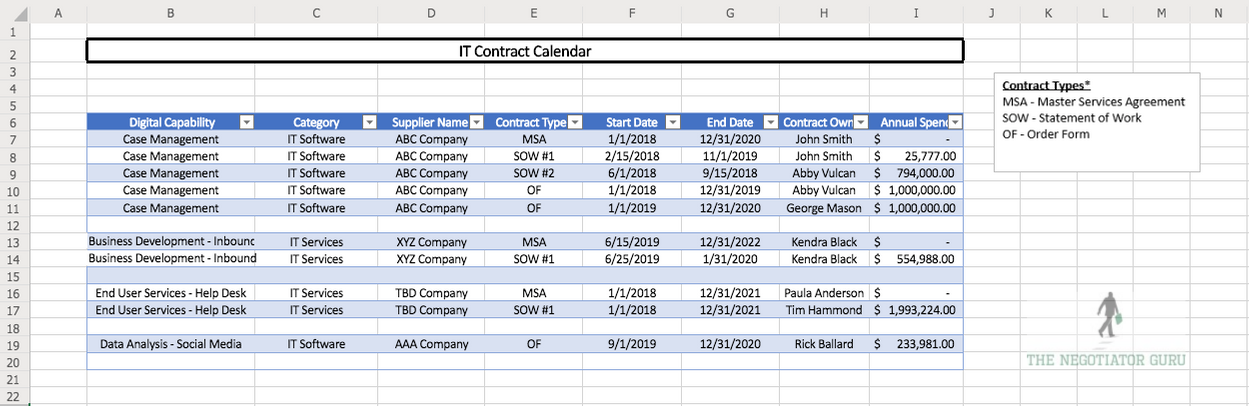
Essentially, this list will have the vendor name, contract type, contract term, and price. Consultant groups charge millions for this fancy spreadsheet but you can create one yourself from my free template.
Through this process, you’ll identify 2 things:
- How much you’re spending every year.
- How many IT contracts you have with each supplier.
With this information, you can tackle the next step. You now know what contracts are coming up for renewal and when. You know the negotiation period and can bring in extra help in advance to work through that process. And finally, you can now work on co-terming all the order forms and SOWs.
hese adjustments create more administrative ease versus the chaotic burden they’re designed to be.
Once you’ve got a survey on your IT contract landscape, you can move on to Step 2.
Step 2: Analyze Each Supplier Against a Right Size/Right Price Matrix
Start with the suppliers that are your biggest spend items. These will most likely be your ERP provider, your Microsoft Office contract, and your CRM software. Do an internal assessment of these suppliers and determine:
- How much you’re spending;
- When you’re going to renew; and,
- What you’re planning to do in the future.
This will help you determine that you are, in fact, only paying for the items that you need versus those that you don’t. All too often companies are paying for products that they aren’t even using because they don’t have a handle on their contracts.
The second thing you’ll be able to keep an eye out for is whether you’re paying for the right license types or not. Challenge your company to look at ways you can downgrade your subscriptions.
The third piece of knowledge you’ll gain from this process is figuring out which business capabilities each supplier is supporting. You’ll be able to see which suppliers are overlapping functionalities.
This overlap is common in decentralized organizations. Each business stakeholder wants to use the software they’re familiar with even though three other companies provide the same capabilities. Your corporation is likely spending way too much on overlapping suppliers that provide the same digital capability.
Paying for software you’re not using is called shelfware. Don’t make the mistake of paying for shelfware.
You need to start this internal assessment process six months before your next contract renewal. If you don’t, you’re going to be playing catch up to these large suppliers because they know more about you than you do.
Step 3: Preparing for negotiation
Create your negotiation team
Your negotiation team should consist of 3 different roles: a business stakeholder, an IT stakeholder, and a negotiator. Sometimes this last role is procurement and sometimes it involves an outside advisor.
Gather benchmark data
In addition to your negotiation team, you’ll need some hard-to-find information. One of the biggest pieces of leverage you can get is benchmark data. This data gives you the prices other firms are paying for the same service. There’s no way your company can know what other businesses are paying unless you bring in an external advisor like The Negotiator Guru.
Create an opportunity analysis
You can analyze your rates against the benchmark to find out how competitive your prices are compared to your industry peers. Similarly, you can analyze your supplier performance metrics, Service Level Agreements, governance process (etc.) against benchmark data to find out how well your suppliers are performing.
And finally, you can analyze your Innovation Quadrant against the benchmark.
How is the supplier driving new ideas, new concepts, process improvements, etc? How are they incentivized to drive cost savings for YOUR company through their relationship with you?
For example:
If you’re using a company like Accenture to run your help desk, there should be a clause in the contract for a 10% target cost savings over the contract term for the services they provide. They do this through process improvements and through automation.
This ensures they are actively working toward providing your company with cost savings to make your business more efficient.
Create a Roadmap of Initiatives
This roadmap has the intent of prioritizing your initiatives to ensure you’re targeting the greatest impact that will take you the least amount of time. Of course, not all initiatives will be easy to achieve but taking a systematic approach to what you work on first is paramount to your success.
To assist with this approach, we suggest categorizing your initiatives so that you can easily sort and isolate the opportunities in front of you. Categories you might consider using include “Quick Win, Strategic Sourcing, and Business Transformational.” Naturally, the progression of cost savings usually increases in scope and impact as you move from Quick Win opportunities to that of Business Transformation.
After you perform your opportunity analysis, get your benchmarks, and create your roadmap of initiatives, you can then pull together a Heat Map. This entails creating a visual graph that clearly identifies the sequencing opportunities.
Here is an example of one of these Heat Maps:
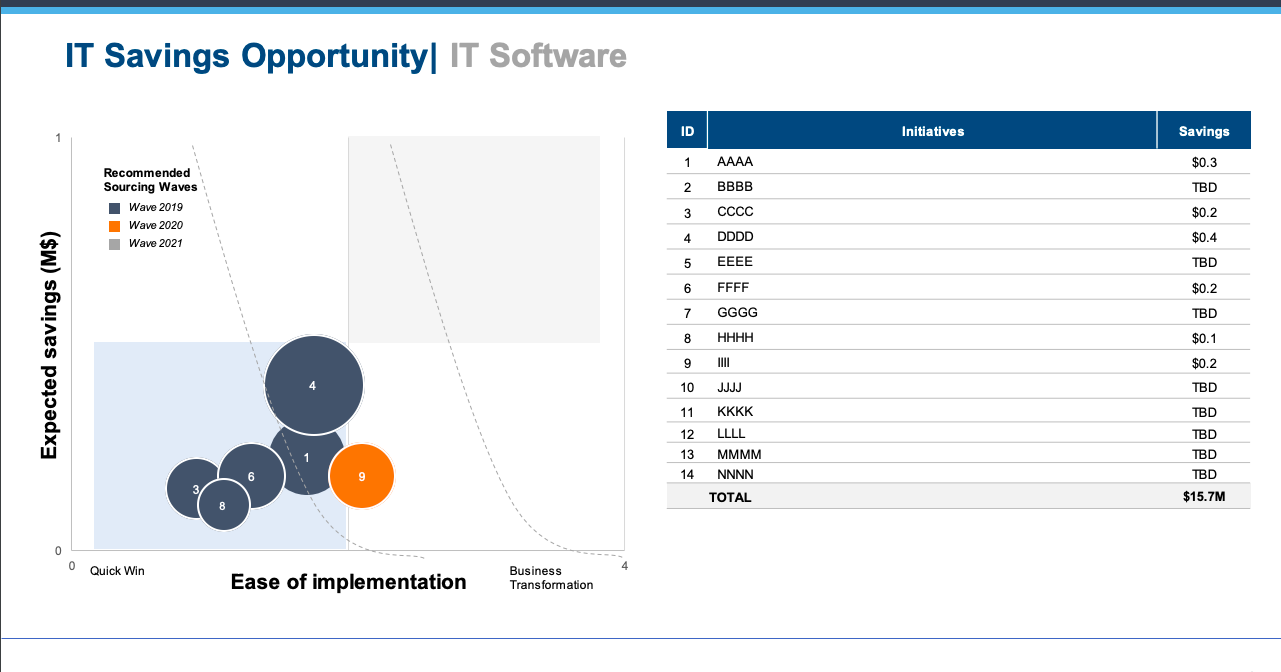
Being proactive with IT contracts can save 25% annually
A stellar negotiation team together with your benchmark data and forward-looking road map will give you a clear direction during the renegotiation process.
Centralizing, and subsequently renegotiating, your contracts with this approach generates on an average 25% P/L cost savings for your company (industry agnostic).
A decentralized company can cost you extra money
If a company has multiple business units and/or sites that are responsible for their own procurement you will undoubtedly have an unstructured supply base. The downstream effects of this situation is that you will have overlap in your supply base, duplicative digital capabilities, and a rats nest of contracts causing incredible inefficiencies and unleveraged spend.
For example, if one branch is using DocuSign for e-signatures and another is using Panda, this is a digital capability overlap that can easily be eliminated.
After your company streamlines your digital capabilities, your company should be able to easily consolidate spend, processes, and contracts. Once you remove the redundancy and get everyone on the same software, you can also negotiate a single contract for your company that drives immediate cost savings and long-term cost avoidance.
IT Contracts create both opportunity and risk in Merger & Acquisition transactions
When combining companies, it’s important to do both a top-down and bottoms-up approach to identifying synergy opportunities within your IT spend.
Top-down approaches involve a lot of financial synergy assumptions based on similar transactions within your industry. These approaches largely identify duplicative roles, processes, etc. and identify a financial target for savings. This approach naturally takes a high-level approach but doesn’t consider the unique needs of your business. To accurately forecast synergy opportunities it should not be the only synergy view to consider.
Bottoms-up approaches, on the other hand, allow you to co-create opportunities with your l business stakeholders that consider business risk, culture, and ease to achieve.
I’ll provide more insight on how to properly prepare for a merger in a future article.
Wrapping It All Up
Follow these steps to properly optimize your current contracts:
- Identify your current state situation.
- Identify your high-spend suppliers.
- Gather benchmark data to see how your contracts stack up.
- Run an Opportunity Analysis to determine overlap and shelfware.
- Create a negotiation team.
- Optimize each contract as its renewal period approaches.

5 Tips for Negotiating a Salesforce Extension
In this article we will discuss how to successfully extend your current Salesforce contract in order to create additional time to successfully prepare and negotiate your renewal agreement. For more detail, read our guide on negotiating with Salesforce.
An extension is commonly needed whenever our clients engage us too late (i.e. too close to their contract renewal) and we need time to successfully complete the Discovery and Strategy Phases of our proprietary 4-Step Negotiation Plan.
Tip #1: Be Confident
We find that most of our clients have either rarely or never requested a contract extension with either Salesforce or any other IT Supplier. As such, this very basic concept becomes daunting for the average IT or Procurement leader as they don’t have either the experience, or past playbook, to execute with natural confidence. This sentiment is augmented by the fact that Salesforce will automatically inform you that they never allow extensions. If you’ve read our previous articles, then you’ll know this is yet another canned answer out of their sales playbook. Please know that extensions are granted all the time as long as you know how to ask for them…as such, they are considered the exception vs. the rule.
Tip #2: Focus on the Facts
Share only what is necessary with Salesforce without going into too much detail. You don’t want to expend all of your negotiation equity during this process or you’ll end up hurting yourself down the road. Keep in mind that Salesforce will try and obtain as much information as possible during this stage so they can decide 1) whether or not to grant the extension and 2) to determine how prepared you are as an organization.
Tip #3: Establish the Why
Like any human scenario, it’s always easier to influence people if they understand the intent and context behind any request. This scenario is no different as you’ll want to answer in a way that is authentic to your organization but intentionally vague in material content. Typical responses we find most effective are the following:
- Active interest in exploring new digital capabilities and need time to make internal decisions;
- Internally restructuring the Salesforce relationship accountability;
- Aligning multiple stakeholders within your organization to accurately capture the wants and needs over the next 5 years;
- In the process of obtaining end user feedback and need some additional time to finalize, analyze, and make decisions, etc.
Tip #4: Create a Timeline with Milestones
Salesforce will be far more willing to accept an extension request if they understand the timeline in which you plan on making decisions. This in a sense shows a partnership mentality which is both real and healthy. Develop a basic timeline of when you plan on making internal and external decisions that provides a good amount of cushion in favor of your organization.
Tip #5: Keep your Promises
Constant and honest communication is key. All too often we find individuals/companies making the mistake of playing the power client position. In other words, the client exemplifies a lack of empathy or care for the sales process and holds all information back thinking that they are protecting their position. After years of research and proven experience we have repeatedly disproven that hypothesis. Instead, we find providing regular milestone updates to Salesforce (or any IT supplier) shows a level of commitment to the relationship and will pay dividends at the final negotiated deal. Summary It’s important to recognize that each client scenario offers its unique challenges and opportunity. That being said, the guiding principles laid out above will prove effective no matter your situation. Be confident in your request, focus on the facts of your specific situation, build credibility with Salesforce by providing context into the request, set expectations via timeline with milestones, and deliver on your promises. We use these same effective tactics every day and hope you find them useful in your future endeavors.
Summary
It’s important to recognize that each client scenario offers its unique challenges and opportunity. That being said, the guiding principles laid out above will prove effective no matter your situation. Be confident in your request, focus on the facts of your specific situation, build credibility with Salesforce by providing context into the request, set expectations via timeline with milestones, and deliver on your promises. We use these same effective tactics every day and hope you find them useful in your future endeavors.
Start with a CIA.
That’s a Client Intake Assessment.
Upload your contract data or schedule a discovery call. If we can’t identify at least a 10%+ from a TNG Right Pricing™ opportunity, we won’t take your money (but we will offer you some free advice!)
